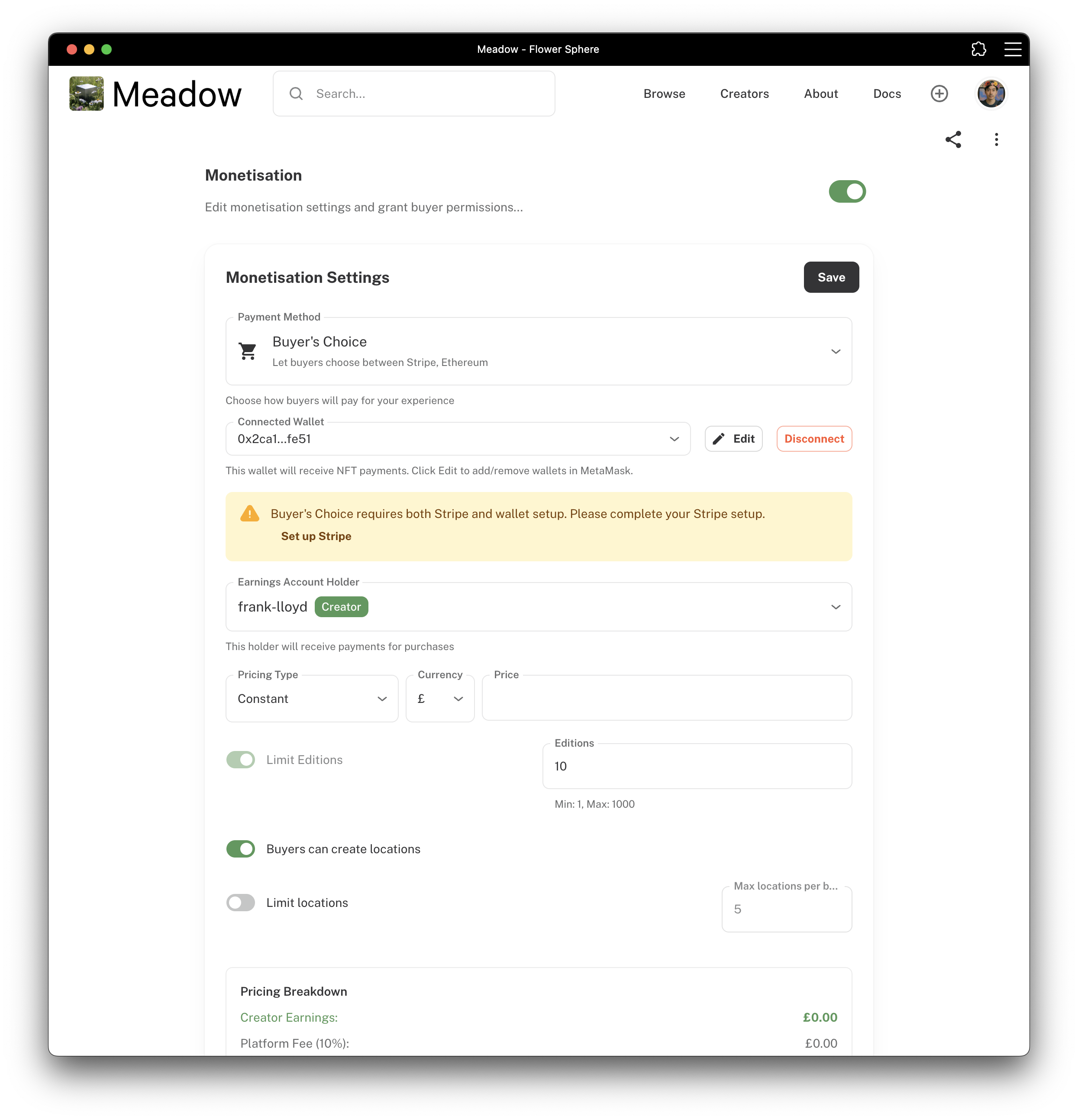
Transform your digital experience into a revenue-generating asset by configuring pricing, payment methods, and delivery options.
Getting Started
To begin selling your experience, navigate to your experience settings and toggle on the monetization option. This unlocks all revenue features including pricing controls, payment processing, and certificate generation.
⚠️ WARNING: Once monetization is enabled on a public experience:
• You cannot disable monetization
• You cannot edit monetization settings
• You cannot make the experience private
• You cannot delete the experience
Pricing & Editions
Set Your Price
Choose your base price in EUR, GBP, or USD. This is the amount buyers pay and what you earn before the 10% platform fee (which covers payment processing and platform maintenance).
*Reasles have a reduced 5% platform fee
Limited Editions
Create scarcity and collector value. Set a total count (1-1000 items) and each buyer receives a numbered edition. Perfect for NFT collectors and exclusive releases.
Payment Methods
Choose how buyers can pay for your experience:
Credit Card (Stripe) offers the widest accessibility with familiar checkout process and instant payment confirmation. Best for reaching mainstream audiences.
Buyer’s Choice allows both credit card and cryptocurrency payments, maximizing your market reach. Crypto payments automatically generate NFTs on the blockchain. (MetaMask wallet required)
Certificates
Physical certificates will be added to editions at additional price depending on the buyer’s location, professionally printed through our global pratner’s network and delivered within 5-10 business days.
Map Placement
Map Placement allows buyers to mark their location on your experience map (default limit: 3 locations per buyer). This builds community and provides social proof of global ownership.
Physical certificate shipping is available worldwide through our Gelato integration, with automatic cost calculation and full tracking information.
Setup Process
Enable monetization in your experience settings
Set pricing and choose edition type
Configure payment methods and connect Stripe if needed
Select certificate templates and shipping options
Test the purchase process before going live
Need Help?
If you encounter issues with Stripe account verification, high gas fees, or shipping restrictions, contact support for assistance.
Next: Monitor your revenue with the Earnings Dashboard to track sales and manage payouts.
On this Page
Monetization Settings
Transform your digital experience into a revenue-generating asset by configuring pricing, payment methods, and delivery options.
Getting Started
To begin selling your experience, navigate to your experience settings and toggle on the monetization option. This unlocks all revenue features including pricing controls, payment processing, and certificate generation.
⚠️ WARNING: Once monetization is enabled on a public experience:
• You cannot disable monetization
• You cannot edit monetization settings
• You cannot make the experience private
• You cannot delete the experience
Pricing & Editions
Set Your Price
Choose your base price in EUR, GBP, or USD. This is the amount buyers pay and what you earn before the 10% platform fee (which covers payment processing and platform maintenance).
*Reasles have a reduced 5% platform fee
Limited Editions
Create scarcity and collector value. Set a total count (1-1000 items) and each buyer receives a numbered edition. Perfect for NFT collectors and exclusive releases.
Payment Methods
Choose how buyers can pay for your experience:
Credit Card (Stripe) offers the widest accessibility with familiar checkout process and instant payment confirmation. Best for reaching mainstream audiences.
Buyer’s Choice allows both credit card and cryptocurrency payments, maximizing your market reach. Crypto payments automatically generate NFTs on the blockchain. (MetaMask wallet required)
Certificates
Physical certificates will be added to editions at additional price depending on the buyer’s location, professionally printed through our global pratner’s network and delivered within 5-10 business days.
Map Placement
Map Placement allows buyers to mark their location on your experience map (default limit: 3 locations per buyer). This builds community and provides social proof of global ownership.
Physical certificate shipping is available worldwide through our Gelato integration, with automatic cost calculation and full tracking information.
Setup Process
Enable monetization in your experience settings
Set pricing and choose edition type
Configure payment methods and connect Stripe if needed
Select certificate templates and shipping options
Test the purchase process before going live
Need Help?
If you encounter issues with Stripe account verification, high gas fees, or shipping restrictions, contact support for assistance.
Next: Monitor your revenue with the Earnings Dashboard to track sales and manage payouts.